PDF to PDF/A API
Reliable PDF to PDF/A API for long-term archiving, VeraPDF certified, with batch processing and optional embedded e-invoice XML.
In today's digital-first business environment, document archiving isn't just about storage. It's about compliance, accessibility, and future-proofing your critical business records. If your organization handles invoices, contracts, or any documents requiring long-term preservation, the shift to PDF/A format isn't optional - it's essential.
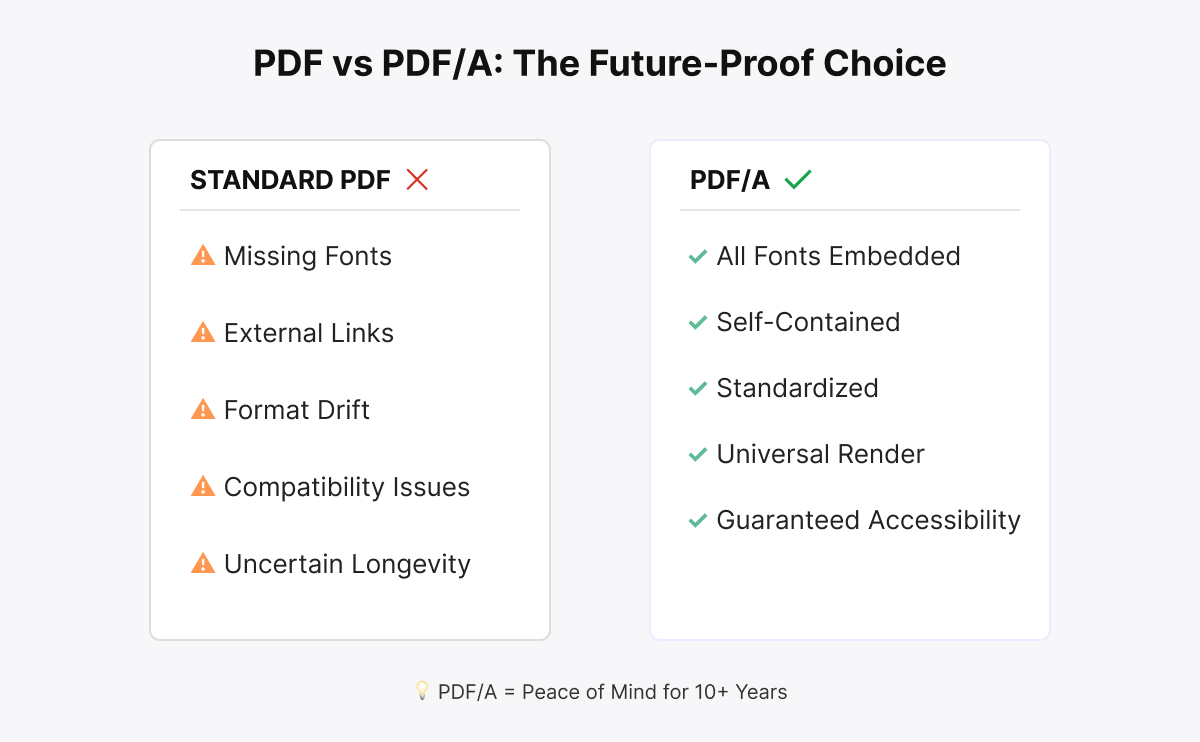
Most businesses store thousands of documents in standard PDF format without realizing the ticking time bomb they're sitting on. Standard PDFs can become unreadable over time due to:
When your auditor requests invoices from five years ago, or a legal dispute requires documents from a decade past, discovering that your files are corrupted or unreadable is more than inconvenient. It's potentially catastrophic.
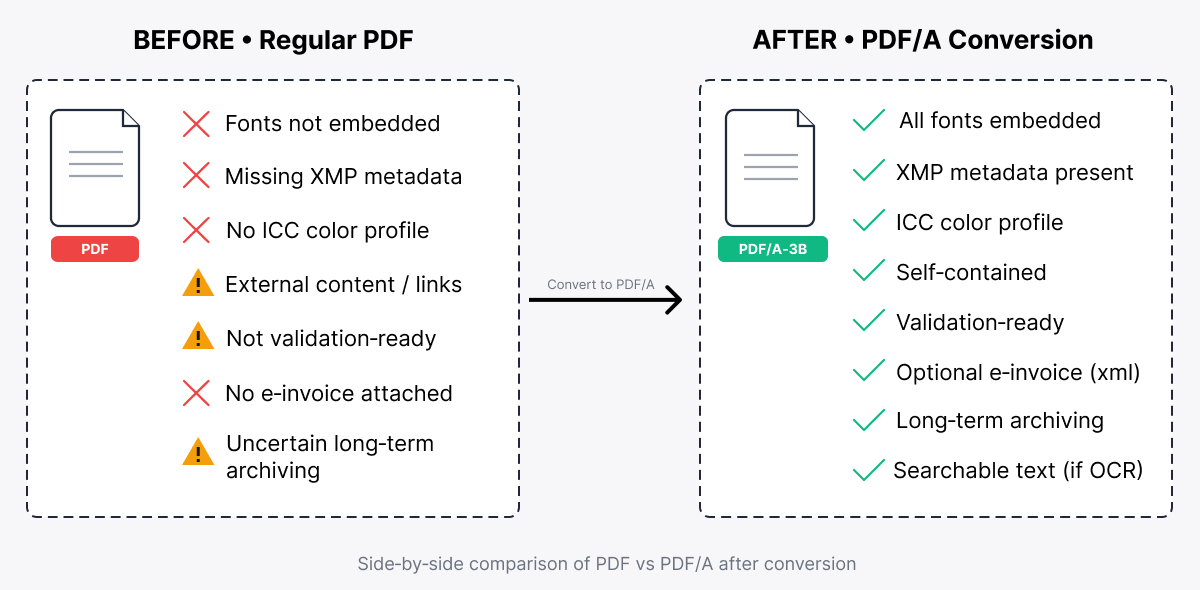
PDF/A (ISO 19005) was specifically designed for long-term document preservation. Unlike standard PDFs, PDF/A files are:

For businesses, this means confidence that your documents will remain accessible and legally valid for years to come.
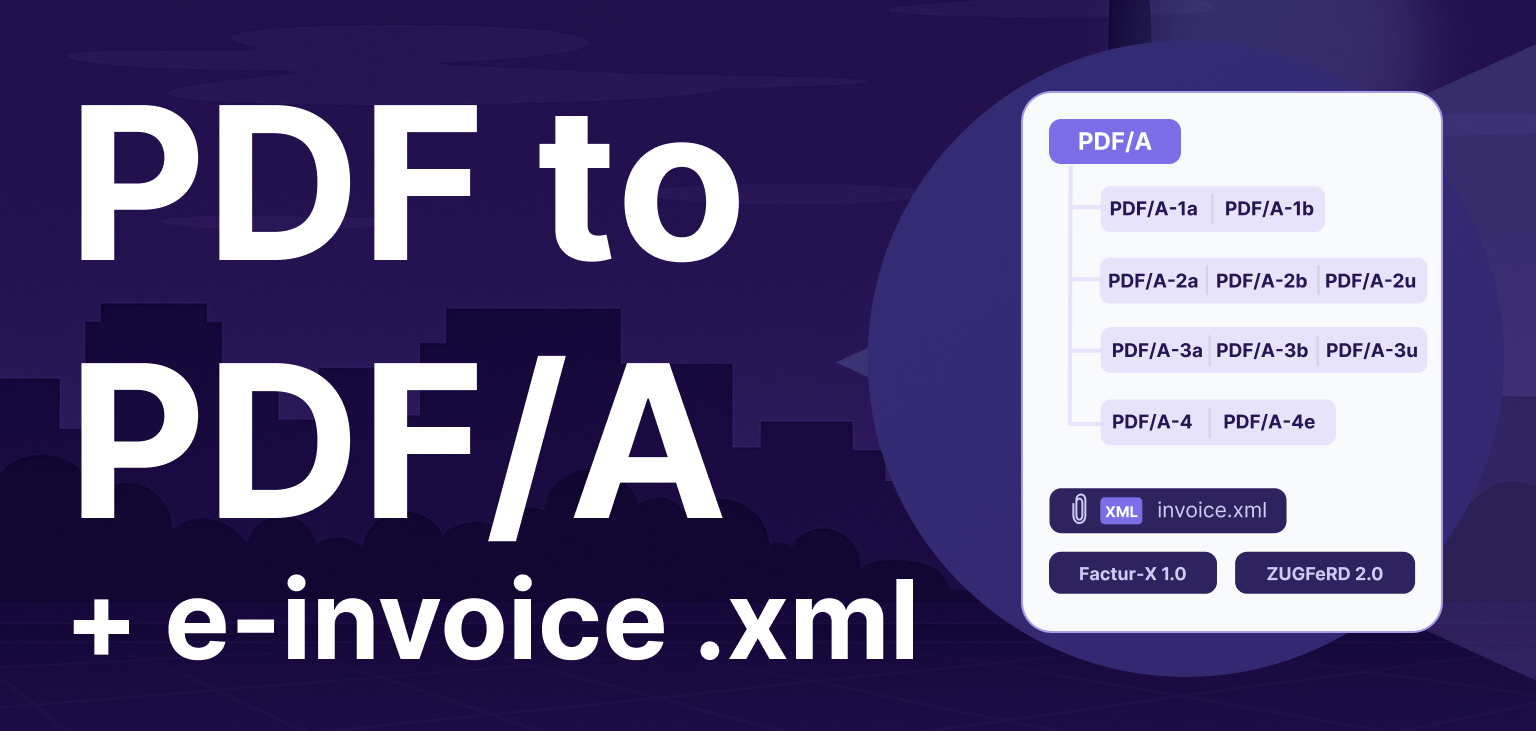
ConvertAPI supports all major PDF/A versions to match your specific compliance requirements:
PDF/A-1 (ISO 19005-1:2005)
PDF/A-2 (ISO 19005-2:2011)
PDF/A-3 (ISO 19005-3:2012)
PDF/A-4 (ISO 19005-4:2020)
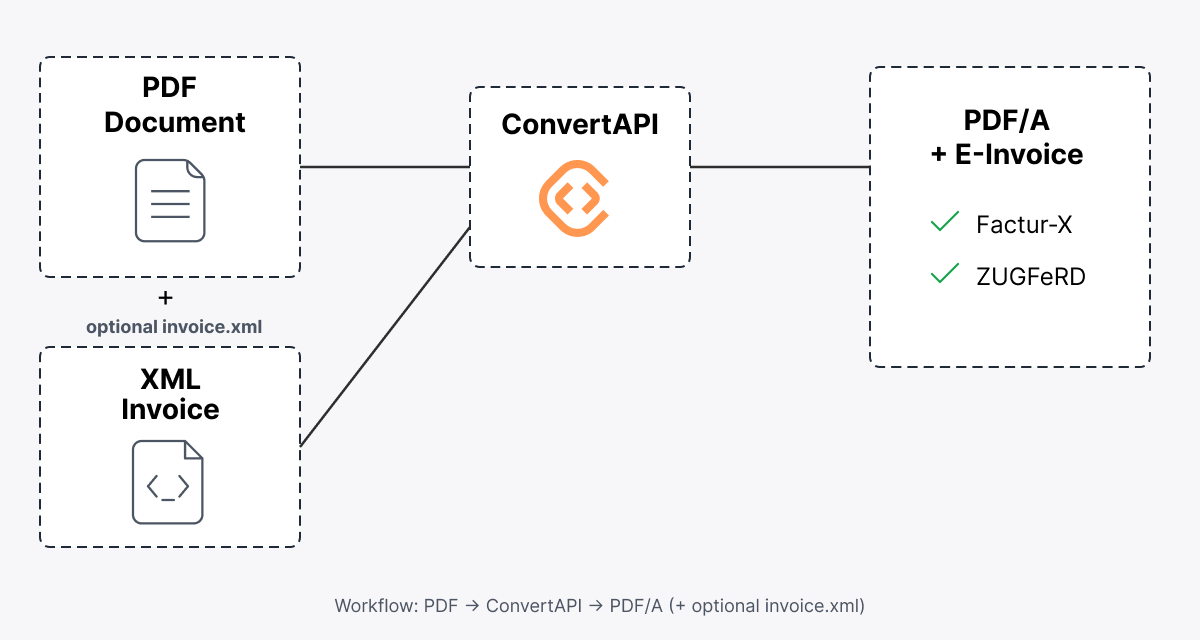
For e-invoicing with Factur-X or ZUGFeRD, use PDF/A-3b or PDF/A-3a, as these versions support embedded XML files while maintaining archival compliance.

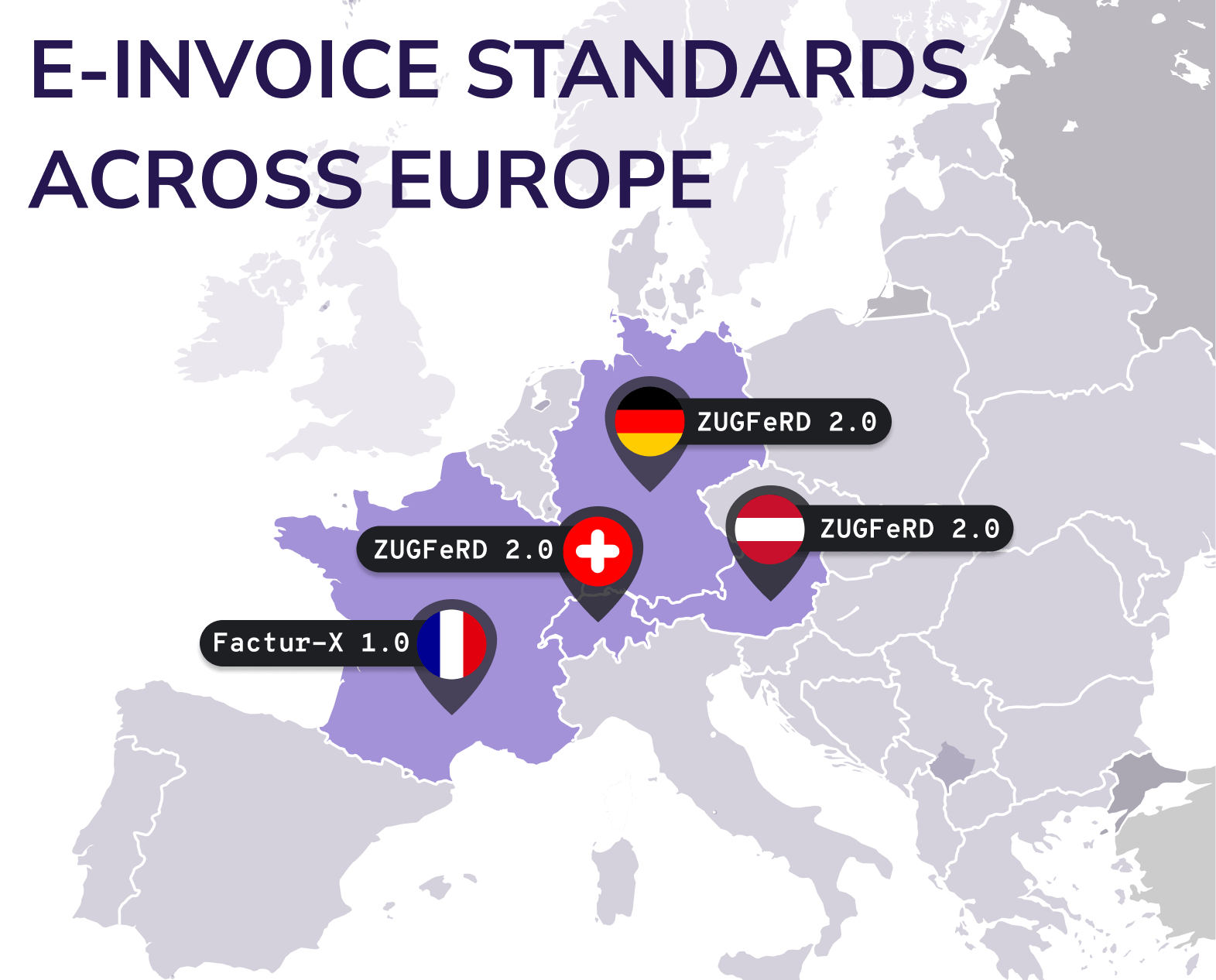
If you operate in Europe or do business with European partners, you've likely encountered the e-invoicing mandate sweeping across the continent. France's Factur-X and Germany's ZUGFeRD standards combine PDF/A visual invoices with structured XML data, giving you human-readable documents with machine-processable information.

This hybrid approach delivers powerful benefits:
Companies in regulated industries like finance, healthcare, and government contracting face stringent document retention requirements. Converting invoices and contracts to PDF/A with embedded e-invoice data ensures you meet both archival and digital reporting standards simultaneously.
Use case: A medical equipment supplier must retain invoices for 10 years while providing machine-readable data to accounting systems. PDF/A conversion with ZUGFeRD support handles both requirements in a single file format.
Businesses operating across borders need to accommodate different e-invoicing standards. Whether your customers require Factur-X 1.0 in France or ZUGFeRD 2.0 in Germany, support for multiple profiles ensures seamless operations across markets.
Use case: A logistics company invoices clients across Europe. With API-based PDF/A conversion supporting multiple e-invoice standards, their billing system automatically generates compliant invoices for each market without manual intervention.
Legacy systems often generate standard PDFs that require manual processing. Converting these to PDF/A with embedded structured data enables automated workflows, reducing operational costs and accelerating business processes.
Use case: An enterprise with 50,000 monthly invoices converts all output to PDF/A with ZUGFeRD data, enabling fully automated invoice processing that cuts accounts payable processing time by 70%.
Organizations migrating to cloud-based document management systems need assurance that archived documents remain accessible indefinitely. PDF/A conversion during migration or as part of ongoing workflows provides that guarantee.
Use case: A professional services firm moving 15 years of client files to cloud storage converts everything to PDF/A during migration, ensuring long-term accessibility while reducing file size and storage costs.
Building in-house PDF/A conversion capabilities is complex, time-consuming, and expensive. Libraries and tools require constant updates, compliance with evolving standards demands ongoing attention, and scaling infrastructure for peak loads adds operational overhead.
An API-based approach transforms this challenge into a competitive advantage:
Add PDF/A conversion to your existing applications with a simple API call. No complex software installations, no infrastructure to manage. Just reliable, on-demand conversion that scales with your needs.
Standards evolve. Regulations change. An API service handles updates automatically, ensuring your conversions always meet the latest Factur-X, ZUGFeRD, and PDF/A requirements without requiring code changes.
Process ten documents or ten thousand. API-based conversion scales instantly to match your demand. No need to provision servers for peak loads or worry about idle resources during slow periods.
Your developers build features that differentiate your business, not document conversion infrastructure. Outsource the complexity and let your team focus on what matters.

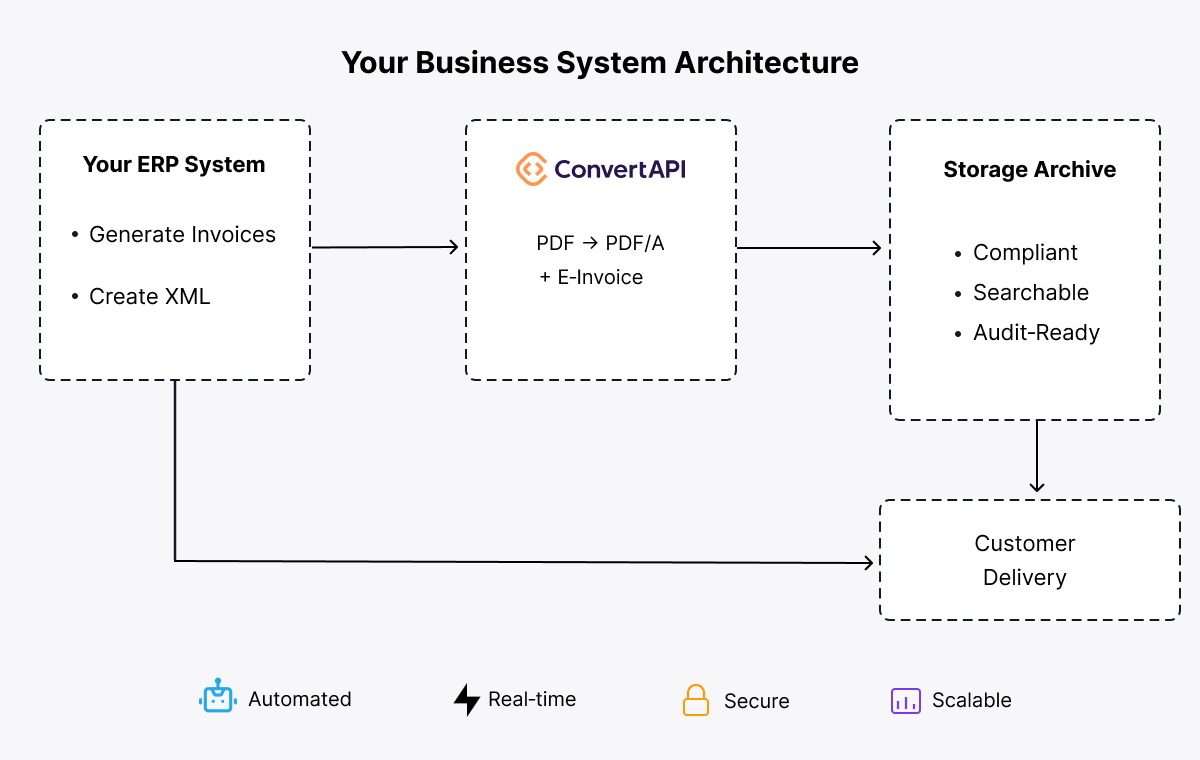
Integrate PDF/A conversion into your invoice generation workflow. As your ERP creates invoices, automatically convert them to PDF/A with the appropriate e-invoice XML embedded based on customer location and requirements.

Build PDF/A conversion into your document upload and archiving workflows. As users upload files or documents reach retention status, automatically convert to PDF/A for long-term storage.
Process large document archives in batches, converting legacy invoice repositories to compliant PDF/A format with proper e-invoice data extraction and embedding.
Offer PDF/A conversion as a value-added feature in your application. Give customers the ability to generate archive-grade documents with embedded structured data on demand.
Consider the costs of not implementing proper document archival and e-invoice support:
Compare these risks and costs against a simple API integration that handles compliance automatically. For most businesses, the ROI is measured in weeks, not months.
Implementing PDF/A conversion with e-invoice support doesn't require months of development. With a well-designed API, you can have your first conversions running in under an hour. Here's how simple it is:
Want to test the API immediately? A single command line call is all it takes:
curl -X POST https://v2.convertapi.com/convert/pdf/to/pdfa \
-H "Authorization: Bearer YOUR_API_TOKEN" \
-F "File=@/path/to/invoice.pdf" \
-F "StoreFile=true" \
-F "PdfaVersion=PdfA3a" \
-F "InvoiceFormat=zugferd2" \
-F "InvoiceFile=@/path/to/invoice.xml"
This converts a PDF to PDF/A-3a format with ZUGFeRD 2.0 e-invoice XML embedded. The StoreFile=true parameter stores the result on ConvertAPI servers for easy retrieval.
For Factur-X support:
curl -X POST https://v2.convertapi.com/convert/pdf/to/pdfa \
-H "Authorization: Bearer YOUR_API_TOKEN" \
-F "File=@/path/to/invoice.pdf" \
-F "StoreFile=true" \
-F "PdfaVersion=PdfA3a" \
-F "InvoiceFormat=facturx" \
-F "InvoiceFile=@/path/to/facturx.xml"
Perfect for French market compliance with Factur-X 1.0 embedded invoice data.
For enterprise applications, integrating into your .NET workflow is equally straightforward using the ConvertAPI C# library:
using ConvertApiDotNet;
using System;
using System.IO;
using System.Threading.Tasks;
public class PdfAConverter
{
private readonly ConvertApi _convertApi;
public PdfAConverter(string apiToken)
{
_convertApi = new ConvertApi(apiToken);
}
public async Task<ConvertApiResponse> ConvertToPdfA(
string pdfFilePath,
string invoiceXmlPath = null,
string invoiceFormat = "zugferd2",
string pdfaVersion = "PdfA3b")
{
if (!string.IsNullOrEmpty(invoiceXmlPath))
{
// Convert PDF to PDF/A with embedded e-invoice XML
return await _convertApi.ConvertAsync("pdf", "pdfa",
new ConvertApiFileParam("File", pdfFilePath),
new ConvertApiFileParam("InvoiceFile", invoiceXmlPath),
new ConvertApiParam("PdfaVersion", pdfaVersion),
new ConvertApiParam("InvoiceFormat", invoiceFormat)
);
}
else
{
// Convert PDF to PDF/A without e-invoice
return await _convertApi.ConvertAsync("pdf", "pdfa",
new ConvertApiFileParam("File", pdfFilePath),
new ConvertApiParam("PdfaVersion", pdfaVersion)
);
}
}
}
// Usage example
var converter = new PdfAConverter("YOUR_API_TOKEN");
// Convert invoice with ZUGFeRD 2.0 XML
var result = await converter.ConvertToPdfA(
@"C:\invoices\invoice-12345.pdf",
@"C:\invoices\invoice-12345.xml",
"zugferd2",
"PdfA3b"
);
// Save the converted PDF/A file
await result.SaveFilesAsync(@"C:\invoices\archived");Here's how this fits into a typical invoice generation workflow:
public class InvoiceService
{
private readonly PdfAConverter _pdfConverter;
private readonly string _tempPath = @"C:\temp\invoices";
private readonly string _archivePath = @"C:\archive\invoices";
public InvoiceService(string apiToken)
{
_pdfConverter = new PdfAConverter(apiToken);
}
public async Task ProcessInvoice(Invoice invoice)
{
// 1. Generate standard PDF invoice
var pdfPath = Path.Combine(_tempPath, $"invoice-{invoice.Number}.pdf");
await GenerateInvoicePdf(invoice, pdfPath);
// 2. Generate XML invoice data
var xmlPath = Path.Combine(_tempPath, $"invoice-{invoice.Number}.xml");
await GenerateInvoiceXml(invoice, xmlPath);
// 3. Determine format based on customer country
var format = GetInvoiceFormatForCountry(invoice.CustomerCountry);
// 4. Convert to PDF/A with embedded e-invoice
var result = await _pdfConverter.ConvertToPdfA(
pdfPath,
xmlPath,
format,
"PdfA3b"
);
// 5. Save archive-compliant version
var archivePath = Path.Combine(_archivePath, invoice.Year.ToString());
Directory.CreateDirectory(archivePath);
await result.SaveFilesAsync(archivePath);
// 6. Get the saved file path for customer delivery
var archivedFile = Path.Combine(archivePath,
result.Files[0].FileName);
// 7. Send to customer
await EmailInvoice(invoice.Customer.Email, archivedFile);
// 8. Clean up temporary files
File.Delete(pdfPath);
File.Delete(xmlPath);
Console.WriteLine($"Invoice {invoice.Number} processed and archived");
}
private string GetInvoiceFormatForCountry(string country)
{
return country switch
{
"FR" => "facturx", // Factur-X 1.0 for France
"DE" => "zugferd2", // ZUGFeRD 2.0 for Germany
"AT" => "zugferd2", // ZUGFeRD 2.0 for Austria
"CH" => "zugferd2", // ZUGFeRD 2.0 for Switzerland
_ => "zugferd2" // Default to ZUGFeRD 2.0
};
}
}Need to convert existing invoice archives? Batch processing is simple:
public class ArchiveConverter
{
private readonly ConvertApi _convertApi;
public ArchiveConverter(string apiToken)
{
_convertApi = new ConvertApi(apiToken);
}
public async Task ConvertInvoiceArchive(
string sourceDirectory,
string outputDirectory)
{
var pdfFiles = Directory.GetFiles(sourceDirectory, "*.pdf");
Console.WriteLine($"Found {pdfFiles.Length} invoices to convert");
// Process in parallel with rate limiting
var semaphore = new SemaphoreSlim(5); // Max 5 concurrent conversions
var successCount = 0;
var failureCount = 0;
var tasks = pdfFiles.Select(async pdfPath =>
{
await semaphore.WaitAsync();
try
{
var fileName = Path.GetFileNameWithoutExtension(pdfPath);
var xmlPath = Path.Combine(sourceDirectory, $"{fileName}.xml");
ConvertApiResponse result;
// Check if corresponding XML exists
if (File.Exists(xmlPath))
{
result = await _convertApi.ConvertAsync("pdf", "pdfa",
new ConvertApiFileParam("File", pdfPath),
new ConvertApiFileParam("InvoiceFile", xmlPath),
new ConvertApiParam("PdfaVersion", "PdfA3b"),
new ConvertApiParam("InvoiceFormat", "zugferd2")
);
}
else
{
// Convert without e-invoice XML
result = await _convertApi.ConvertAsync("pdf", "pdfa",
new ConvertApiFileParam("File", pdfPath),
new ConvertApiParam("PdfaVersion", "PdfA3b")
);
}
await result.SaveFilesAsync(outputDirectory);
Interlocked.Increment(ref successCount);
Console.WriteLine($"✓ Converted: {fileName}");
}
catch (Exception ex)
{
Interlocked.Increment(ref failureCount);
Console.WriteLine($"✗ Failed: {Path.GetFileName(pdfPath)} - {ex.Message}");
}
finally
{
semaphore.Release();
}
});
await Task.WhenAll(tasks);
Console.WriteLine($"\nConversion complete:");
Console.WriteLine($" Success: {successCount}");
Console.WriteLine($" Failed: {failureCount}");
}
}
// Usage
var converter = new ArchiveConverter("YOUR_API_TOKEN");
await converter.ConvertInvoiceArchive(
@"C:\legacy-invoices\2023",
@"C:\archive\2023"
);
The technical implementation is straightforward, but the business impact is transformative - compliant archiving, automated processing, and future-proof documentation in one solution.
E-invoicing mandates are expanding across Europe and globally. Document retention requirements aren't getting simpler. The longer you wait to implement PDF/A archival and structured invoice data, the larger your technical debt and compliance risk grow.
The businesses winning in this environment aren't trying to build everything themselves. They're leveraging specialized APIs that handle complexity while they focus on serving customers and growing revenue.
Your documents contain your business history, your legal protections, and your financial records. Isn't it time to ensure they're preserved properly?
Explore the PDF to PDF/A conversion API at convertapi.com/pdf-to-pdfa and see how simple compliance can be.