Validate PDF/A API
veraPDF-based PDF/A validation API to verify ISO 19005 compliance and conformance levels for archival documents.
 Tomas, CEO
If you're building a document pipeline that produces or accepts PDF/A files, for legal e-filing, electronic invoicing, government submissions, or long-term archives, you need a way to verify compliance programmatically. A .pdf extension tells you nothing. Even the file's own metadata can lie about its conformance level, because PDF/A metadata can be added (or wrong) without the underlying file actually meeting the ISO 19005 rules.
For developers, the question isn't whether to validate, it's how to integrate validation reliably into a pipeline without dragging a JVM into a serverless function or pinning your build to a $10K/year on-premise license.
This guide covers everything a developer needs to validate PDF/A files in production: what the ISO 19005 standard actually checks, the differences between PDF/A-1, PDF/A-2, and PDF/A-3, the A/B/U conformance levels, and four practical methods to validate PDF/A compliance, with working code examples in C#, Python, Java, and Node.js, and a side-by-side comparison of veraPDF, Adobe Preflight, ConvertAPI, and 3-Heights.
PDF/A is a restricted subset of the regular PDF specification. It removes features that make long-term preservation unreliable, things that depend on external resources, runtime computation, or software that might not exist in 50 years.
A compliant PDF/A file must:
Validation is the process of checking a PDF against the hundreds of rules defined in ISO 19005. Tools that claim to produce PDF/A don't always get it right, especially when converting from Word, HTML, or images. Real-world validation failures are common:
If you're building a document pipeline that produces archival PDFs, or receives them from third parties, you need a reliable way to validate PDF/A compliance before accepting the file as valid.
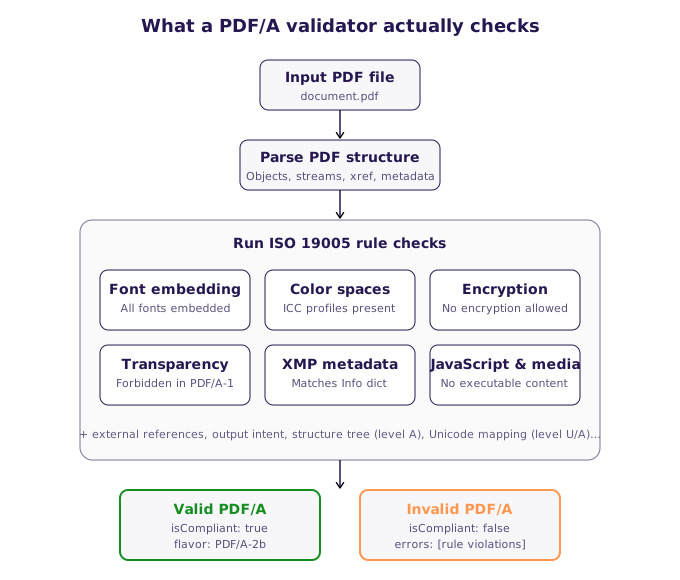
How a PDF/A validator processes a file: parse structure, run hundreds of ISO 19005 rule checks, produce a structured report.
Before validating, you need to know what you're validating against. This is where most developers get confused.
PDF/A-1 (ISO 19005-1, published 2005): based on PDF 1.4. The strictest and most widely required standard. Used by most government and legal archives. No transparency, no layers, no JPEG 2000.
PDF/A-2 (ISO 19005-2, published 2011): based on PDF 1.7. Adds support for transparency, layers, JPEG 2000 compression, and PDF/A file attachments (only other PDF/A files can be attached). Most modern document systems accept PDF/A-2.
PDF/A-3 (ISO 19005-3, published 2012): same as PDF/A-2, but allows any file type as an embedded attachment. Commonly used for electronic invoicing (ZUGFeRD, Factur-X) where the PDF contains a human-readable invoice plus an embedded XML data file.
Each version has multiple conformance levels:
So the full list of conformance identifiers is: PDF/A-1a, PDF/A-1b, PDF/A-2a, PDF/A-2b, PDF/A-2u, PDF/A-3a, PDF/A-3b, PDF/A-3u.
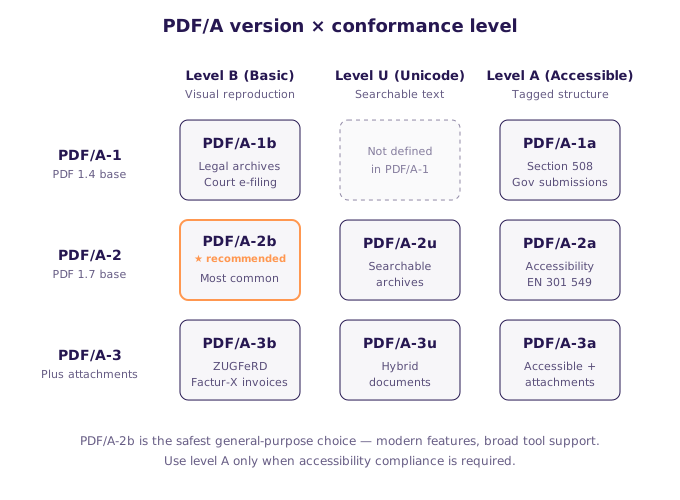
The eight valid PDF/A flavors mapped across version (PDF/A-1, PDF/A-2, PDF/A-3) and conformance level (B, U, A). Note: PDF/A-1 doesn't define a Unicode level.
| Use case | Typical requirement |
|---|---|
| Legal document archiving | PDF/A-1b or PDF/A-2b |
| Government submissions (e.g., US courts, EU public procurement) | PDF/A-1a or PDF/A-2a |
| Long-term corporate archive | PDF/A-2b or PDF/A-3b |
| Accessibility compliance (Section 508, EN 301 549) | PDF/A-1a or PDF/A-2a |
| Electronic invoicing (ZUGFeRD, Factur-X, FatturaPA) | PDF/A-3b |
| Medical records (HIPAA-adjacent archives) | PDF/A-2b or PDF/A-2u |
If you're not sure which level the receiving system accepts, check their submission guidelines. When in doubt, PDF/A-2b is the safest general-purpose choice, it has the broadest tool support and accommodates modern PDF features.
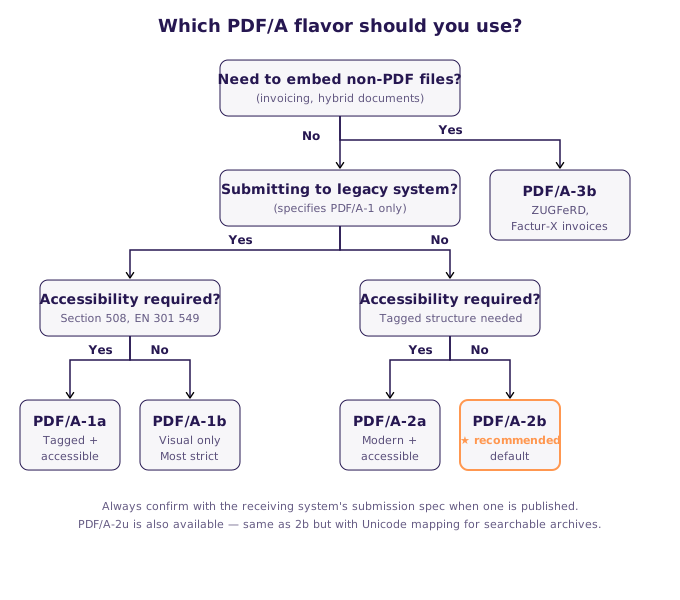
Decision tree for picking the right PDF/A flavor based on attachments, legacy system requirements, and accessibility needs.
veraPDF is the open-source PDF/A validator developed with support from the PDF Association. It's the closest thing the industry has to a reference implementation and is widely used by archival institutions.
Use veraPDF if you need a free, auditable validator for internal use or if you're running one-off validations from the command line. Archives and research libraries often standardize on it.
Download the installer or the CLI from the veraPDF releases page. The CLI version works on Windows, macOS, and Linux.
# Validate a single file (auto-detects the flavor from metadata)
verapdf --format text document.pdf

# Force validation against a specific flavor
verapdf --flavour 2b document.pdf

# Batch validate a directory and output machine-readable MRR (Machine-Readable Report)
verapdf --recurse --format mrr --output ./reports ./pdf-archiveveraPDF is a Java library, so you can call it directly from JVM languages. From other languages, the most practical approach is invoking the CLI as a subprocess and parsing the XML/JSON output.
import subprocess
import json

def validate_with_verapdf(file_path, flavour='2b'):
    result = subprocess.run(
        ['verapdf', '--flavour', flavour, '--format', 'json', file_path],
        capture_output=True, text=True
    )
    report = json.loads(result.stdout)
return report['report']['jobs'][0]['validationResult']['compliant']Adobe Acrobat Pro includes a feature called Preflight that can validate PDF/A compliance against all major flavors.
Preflight is ideal for manual validation by document professionals who already use Acrobat, legal assistants checking court submissions, archivists reviewing individual deposits, or designers verifying client deliverables before handoff.
Open the PDF in Acrobat Pro, then: Tools → Print Production → Preflight → PDF/A Compliance, pick the target profile (for example "Verify compliance with PDF/A-2b"), and click Analyze. Preflight produces a detailed report listing every violation with links to the offending objects in the PDF.
For any automated workflow, Preflight is the wrong tool. It's great for spot-checking, wrong for pipelines.
ConvertAPI's PDF/A validation endpoint provides PDF/A compliance checking via a simple REST API. It supports all PDF/A flavors and returns structured validation results you can parse directly in your application.
For most developers, the friction of running veraPDF in production (JVM dependency, cold-start cost, no SDKs) outweighs the cost savings of self-hosting. A hosted API solves all of this with a single HTTP call and official SDKs in every major language.
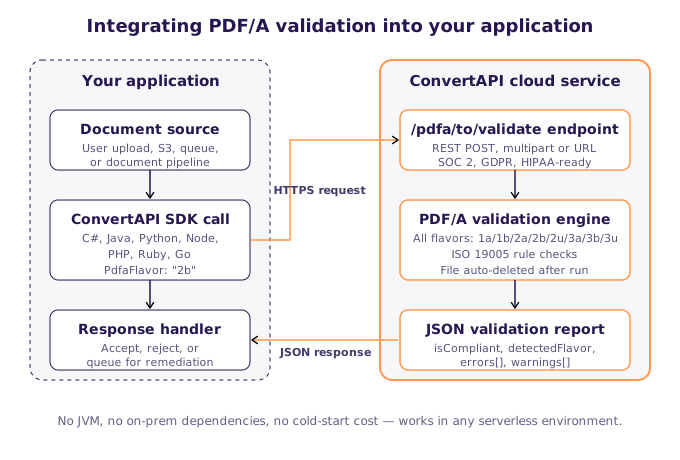
How the ConvertAPI PDF/A validation API plugs into a typical application: SDK call from your code, validation in the cloud, structured JSON response back.
Install-Package ConvertApiusing ConvertApiDotNet;
var convertApi = new ConvertApi("YOUR_API_TOKEN");
var result = await convertApi.ConvertAsync("pdfa", "validate",
new ConvertApiFileParam("document.pdf")
);
// Read the JSON validation report
await result.SaveFilesAsync("./validation-report.json");var result = await convertApi.ConvertAsync("pdfa", "validate",
new ConvertApiFileParam("document.pdf"),
new ConvertApiParam("ExpectedConformance", "pdfA2a") // 1a, 1b, 2a, 2b, 2u, 3a, 3b, 3u
);
var report = await result.ResponseJson();
bool isCompliant = report.IsValid;import convertapi
convertapi.api_credentials = 'YOUR_API_TOKEN'
result = convertapi.convert('validate',
{ 'File': 'document.pdf', 'ExpectedConformance': 'pdfA2a' },
from_format='pdfa'
)
result.save_files('./')const ConvertAPI = require('convertapi');
const convertapi = new ConvertAPI('YOUR_API_TOKEN');
const result = await convertapi.convert('validate',
{ File: 'document.pdf', ExpectedConformance: 'pdfA2a' },
'pdfa'
);
await result.saveFiles('./');ConvertApi convertApi = new ConvertApi("YOUR_API_TOKEN");
ConversionResult result = convertApi.convert("pdfa", "validate",
Arrays.asList(
Param.of("File", new File("document.pdf")),
Param.of("ExpectedConformance", "pdfA2a")
)
).get();
result.saveFiles(Paths.get("./"));If your PDF is already stored in S3, Azure Blob, Google Cloud Storage, or any publicly addressable location, skip the upload step entirely:
var result = await convertApi.ConvertAsync("pdfa", "validate",
    new ConvertApiFileParam(new Uri("https://example.com/archive/document.pdf")),
    new ConvertApiParam("ExpectedConformance", "pdfA2a")
);Validate hundreds of files concurrently, useful for auditing an existing archive:
var files = Directory.GetFiles("./archive", "*.pdf");
var tasks = files.Select(f => convertApi.ConvertAsync("pdfa", "validate",
    new ConvertApiFileParam(f),
    new ConvertApiParam("ExpectedConformance", "pdfA2a")
));

var results = await Task.WhenAll(tasks);Drop PDF/A validation into any web API:
[HttpPost("validate-pdfa")]
public async Task<IActionResult> ValidatePdfA(IFormFile file, string conformance = "pdfA2a")
{
    if (file == null || file.Length == 0)
        return BadRequest("No file uploaded.");

    await using var stream = file.OpenReadStream();
    var result = await _convertApi.ConvertAsync("pdfa", "validate",
        new ConvertApiFileParam(file.FileName, stream),
        new ConvertApiParam("ExpectedConformance", conformance)
    );

    var report = await result.ResponseJson();
    return Ok(new
    {
        isCompliant = report.IsValid,
        violations = report.Errors,
        conformance
    });
}A typical ConvertAPI validation response includes:
IsValid: boolean, whether the file passes validation.PdfaFlavor: the flavor the file was validated against.DetectedFlavor: the flavor declared in the file's XMP metadata (may differ from the validated flavor).Errors: array of rule violations, each with the ISO rule ID, a human-readable description, and (where possible) a reference to the offending object in the PDF.Warnings: non-fatal issues worth reviewing.ConvertAPI PDF/A validation is the best fit for web applications, SaaS platforms, document pipelines, serverless functions, and any automated workflow where you need reliable validation without managing JVM-based infrastructure.
3-Heights PDF Validator from PDF Tools AG is a commercial, on-premise library used heavily in the European archival and regulatory sector.
Ideal for regulated enterprise environments where data cannot leave your network under any circumstances, budget isn't a constraint, and you need to pass formal procurement requirements that specify "on-premise only."
using PdfTools.PdfValidator;

using var validator = new Validator();
using var stream = File.OpenRead("document.pdf");

var report = validator.Analyse(stream, Conformance.PdfA2b);

Console.WriteLine(report.IsConforming
    ? "Valid PDF/A-2b"
    : $"Invalid: {report.Messages.Count} issues");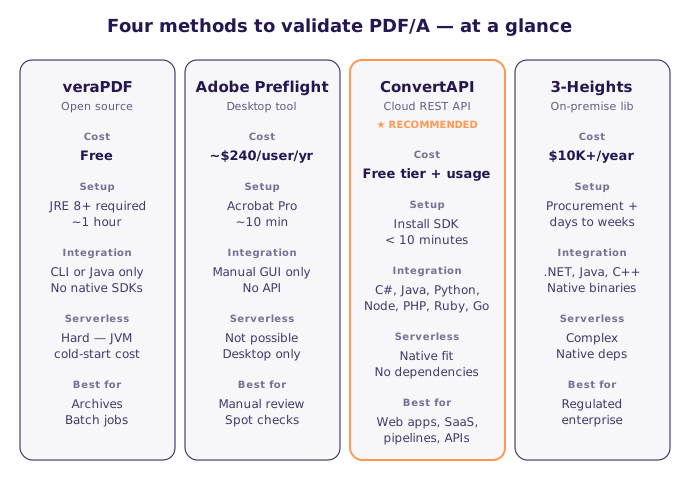
The four PDF/A validation methods compared at a glance: open source, desktop, cloud API, and on-premise commercial.
| Feature | veraPDF | Adobe Preflight | ConvertAPI | 3-Heights |
|---|---|---|---|---|
| Cost | Free | ~$240/user/year | Pay-per-use, free tier | $10,000+/year |
| Automation-friendly | ⚠️ CLI only | ❌ No | ✅ REST API | ✅ Native SDK |
| PDF/A-1 / 2 / 3 support | ✅ All flavors | ✅ All flavors | ✅ All flavors | ✅ All flavors |
| Native SDKs | ❌ Java only | ❌ None | ✅ C#, Java, Python, Node, PHP, Ruby, Go | ✅ C#, Java, C++ |
| Runs on serverless | ⚠️ With custom layers | ❌ No | ✅ Yes | ⚠️ Complex |
| On-premise option | ✅ Yes | ✅ Yes (desktop only) | ❌ Cloud only | ✅ Yes |
| Setup time | ~1 hour | ~10 minutes | <10 minutes | Days to weeks |
| Best for | Archives, research | Manual review | Web apps, APIs, SaaS | Enterprise regulated |
If you're generating PDF/A files and failing validation, these are the most common culprits:
The most common PDF/A violation by far. PDF/A requires every font used in the document to be fully embedded (or properly subset-embedded). The fix depends on how the PDF was created, embed fonts at generation time, or re-process the PDF through a PDF/A-aware converter.
PDF/A requires color management information. Every device-dependent color space (DeviceRGB, DeviceCMYK) must have an output intent specifying an ICC profile. If you're generating PDFs from HTML or Word, configure your converter to include an output intent like sRGB IEC61966-2.1.
PDF/A files cannot be encrypted. Remove any password protection or DRM before validating. If you need both archival compliance and access control, handle access at the storage layer (signed URLs, IAM policies), not in the PDF itself.
Transparency effects, drop shadows, partial opacity, blend modes, are forbidden in PDF/A-1. Either upgrade to PDF/A-2 (which allows transparency), or flatten transparency at generation time.
PDF/A requires that XMP metadata and the legacy Info dictionary stay in sync. If your tool updates one without the other, validation fails. Use a PDF/A-aware library for any post-processing.
All JavaScript must be stripped. This includes form-level scripts, document-level scripts, and field formatting scripts. If you need interactive forms in an archive, use PDF/A-2 with static form fields.
Even if all color spaces are device-independent, PDF/A requires a declared output intent. Add a standard output intent like sRGB during PDF generation.
Choose veraPDF if you need a free, auditable validator, are comfortable managing a JVM-based tool, and primarily run batch validations rather than real-time checks.
Choose Adobe Preflight if you do occasional manual validation as part of a document review workflow and already have Acrobat Pro.
Choose ConvertAPI PDF/A validation if you're building an application, SaaS product, or document pipeline that needs reliable validation with minimal operational overhead. Official SDKs in 8+ languages, no JVM dependency, works in serverless environments, and you can be running in under 10 minutes.
Choose 3-Heights if you have strict on-premise requirements, enterprise budget, and formal regulatory constraints that specifically require an on-premise commercial validator.
Integrate PDF/A validation into your application with a few lines of code. Official SDKs available for C#, Java, Python, Node.js, PHP, Ruby, and Go, no JVM dependency, no infrastructure to manage, and works in any serverless environment.
👉 View the PDF/A Validation API documentation
The free tier includes enough conversion seconds to validate thousands of files per month, more than enough to prototype and run small production workloads. For higher volume, see pricing.
You need a dedicated PDF/A validator. The file extension .pdf alone doesn't tell you anything about PDF/A compliance, and even the XMP metadata can lie. Use veraPDF, Adobe Preflight, or a validation API like ConvertAPI to check against the ISO 19005 rules.
PDF/A-1 is the strictest (based on PDF 1.4, no transparency, no layers). PDF/A-2 adds transparency, layers, JPEG 2000, and PDF file attachments (PDF-only). PDF/A-3 is identical to PDF/A-2 but allows any file type as an attachment, commonly used for electronic invoicing formats like ZUGFeRD and Factur-X.
The letter indicates the conformance level. B (Basic) ensures visual reproduction. U (Unicode) adds Unicode mapping for all text. A (Accessible) adds structural tagging and semantic information required for accessibility compliance.
Yes. Use a validation API like ConvertAPI (REST, with SDKs for C#, Java, Python, Node.js, PHP, Ruby, and Go), or invoke veraPDF as a subprocess from your application. For JVM applications, veraPDF can be used as a library directly.
A PDF's metadata can claim PDF/A compliance while the file actually violates the ISO rules. This happens with older converters, incomplete post-processing, or files that had PDF/A metadata added after modification. Always validate, don't trust metadata.
Yes. ConvertAPI offers a free tier on its PDF/A validation API that's enough to validate thousands of files per month, suitable for prototyping, testing, and small production workloads. For self-hosted, free, open-source validation, veraPDF can be invoked as a CLI subprocess or used as a Java library.
For most new archives, PDF/A-2b is the sweet spot, it supports modern PDF features (transparency, JPEG 2000) while having broad tool support. Use PDF/A-1b if you're submitting to older systems that haven't updated to the 2011 standard. Use PDF/A-2a if accessibility compliance is required.
Yes. A common pipeline is to convert PDF to PDF/A using a PDF/A-aware converter, then validate the output to confirm compliance before storing it in the archive. ConvertAPI supports both operations in a single workflow. For the conversion side - including embedding Factur-X and ZUGFeRD e-invoice XML - see our PDF/A for e-invoicing guide.
Only at the A conformance level (PDF/A-1a, PDF/A-2a, PDF/A-3a). Levels B and U do not require tagged structure or reading order. If you specifically need accessibility compliance (Section 508, WCAG, EN 301 549), validate against an A-level flavor.
Last updated: April 2026. All code examples tested with the latest SDK versions.