10+ Years of Excellence
Automate PDF Accessibility - PDF/UA Tagging & EAA 2025
AI‑assisted PDF tagging, remediation, and validation via API. Built for high volume, multi‑brand enterprises that need accessible documents and reliable data extraction.
10+ Years of Excellence
AI‑assisted PDF tagging, remediation, and validation via API. Built for high volume, multi‑brand enterprises that need accessible documents and reliable data extraction.
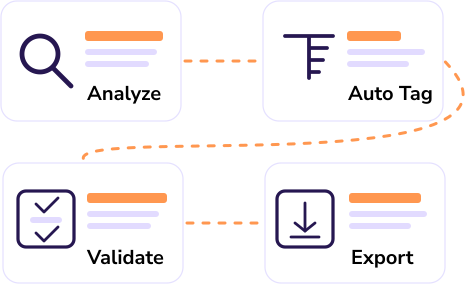
ConvertAPI’s PDF Accessibility Automation helps enterprises turn large volumes of PDFs into accessible, standards-ready documents—without the manual grind. Our engine analyzes layout and semantics to build a complete tagged PDF: headings and reading order, lists, tables with header scope, figures and links, plus properly labeled form fields. For scanned content, built-in OCR reconstructs text and structure so screen readers and other assistive technologies can navigate reliably, boosting usability and trust.
Designed for compliance programs, the workflow targets PDF/UA and aligns with WCAG/EN 301 549, helping organizations prepare for the EU Accessibility Act 2025. Automated checks surface issues early, while validation reports make it easy to review and remediate edge cases. Human approval steps remain available for items like complex tables or nuanced alt text, balancing speed with conformance.
Headings, lists, tables, figures, footnotes, reading order, language - all mapped into a compliant PDF structure tree.
Detect tables and set header scope and associations to improve accessibility and reliable export.
Tag form fields with labels, roles, and logical tab order; preserve keyboard navigation.
Perform OCR, rebuild structure, and export a tagged, screen‑reader‑friendly PDF.
Built‑in checks with export to PDF/UA files; optional PAC 2024 cross‑check in QA.
Enterprise-grade security with ISO 27001 certification, HIPAA & GDPR compliance, audit logs, and regional processing.
You can remediate millions of documents, and receive the conformant PDF/UA. The result is faster, more consistent and cleaner, allowing more accurate data extraction.
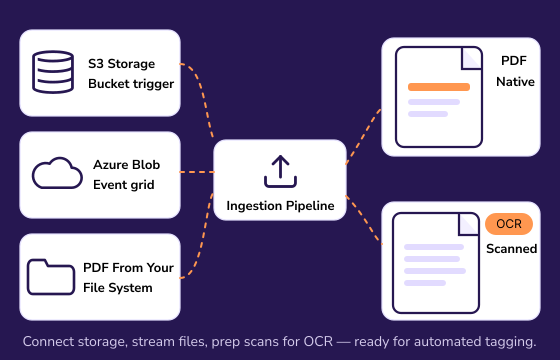
Securely bring in digital and scanned PDFs.
Connect storage or apps and stream files to the pipeline. We fingerprint files, detect languages, and prep scans for OCR so downstream tagging is reliable.
- Connect with: S3, Azure Blob, GCS, HTTPS
- Concurrent conversions & webhook triggers
- Inputs: native PDFs and scans (OCR)
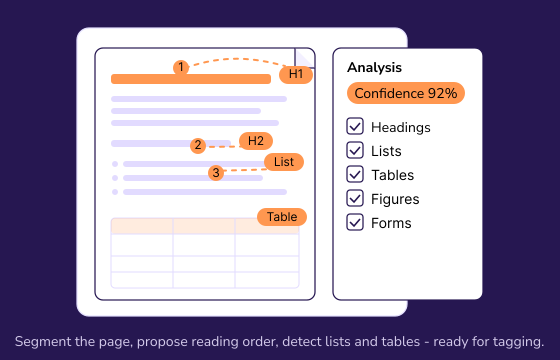
Segment each page and propose a reading order.
Computer vision + NLP identify headings, paragraphs, lists, tables, figures, links, and form fields. Low‑confidence items are flagged for review.
- Table and header‑scope detection
- Page‑level language & direction (LTR/RTL)
- Confidence scores with reasons
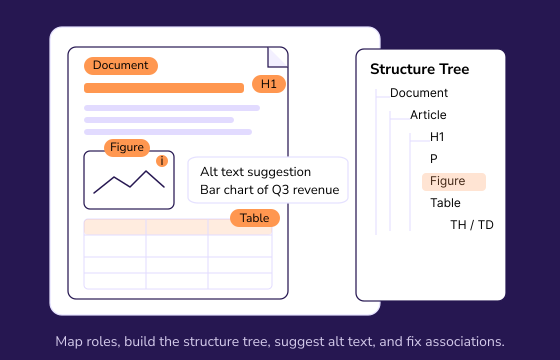
Build a standards‑compliant structure tree.
We map roles to PDF/UA, add landmarks, associate table headers, set list semantics, fix link annotations, and generate alt‑text suggestions for images.
- Headings (H1–H6), lists, tables, figures, footnotes
- Form labels and logical tab order
- Alt‑text suggestions with “needs review” flags
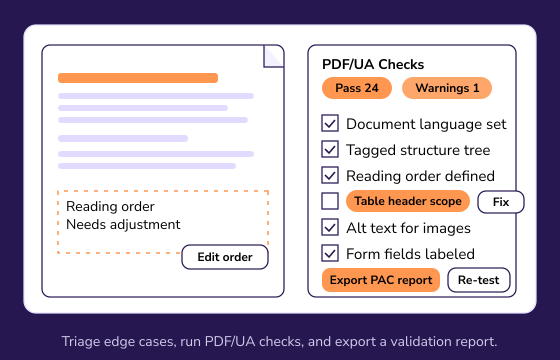
Triage edge cases and run conformance checks.
A lightweight reviewer lets you adjust reading order, approve alt text, and resolve issues. Automated checks highlight what’s left to fix.
- Visual representation of errors
- PDF/UA & EN 301 549 aligned checks
- Export a validation report for QA
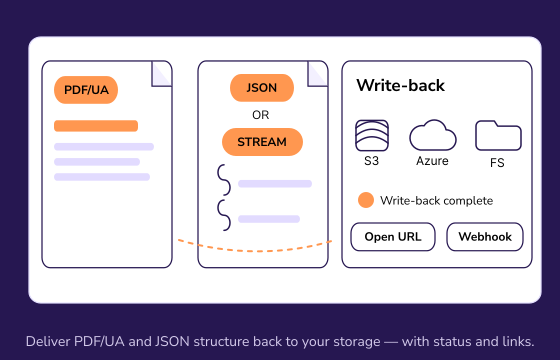
Publish accessible files and unlock clean data.
Deliver a visually identical PDF/UA plus machine‑readable artifacts for analytics and AI.
- Output: PDF/UA‑1 or PDF/UA‑2
- Artifacts: JSON/XML of tags, tables, landmarks
- Delivery: API response, storage write‑back, webhooks
We help businesses comply with EAA now in effect across the EU; supports access to products and services for people with disabilities.
Generate PDF/UA conformant documents with accessible PDF requirements; “tagged PDF” enables predictable reading order and navigation.
Make sure your documents comply with US Federal guidance and resources for accessible PDFs to ensure the documents are accessible to people with disabilities.
Our PDF Accessibility tool provides a well‑tagged structure (headings, lists, tables, figures) improves downstream parsing and table/field capture for analytics and AI.
Whether you're developing an application, or managing complex workflows, our robust tools can be effortlessly integrated to handle document conversion and management at ease.
Our SDKs simplify complex processes, reduce development time, and enhance functionality without the need for extensive coding.
Automation accelerates remediation, but human review is still required for conformance claims (e.g., verifying reading order, alt text meaning).
PDF/UA‑1 and PDF/UA‑2, with checks aligned to WCAG/EN 301 549 where applicable.
Well‑tagged structure clarifies semantics (e.g., tables, headings), which improves downstream parsing accuracy for analytics and AI.
Digital PDFs and scanned PDFs (via OCR). Roadmap includes authoring‑format to accessible‑PDF pipelines.
Built‑in checks plus optional integration with PAC 2024 in your QA workflow.
We ensure that all document processing is handled securely in the cloud, adhering to industry-leading standards like ISO 27001, GDPR, and HIPAA. To enhance security even further, we can ensure that no files or data are stored on our servers and never leave your country.
Learn more about security