DICOM to JPG API
Convert DICOM medical images to JPG. Applies window/level, with control over color space, quality, resolution, and size.
 Tomas, CEO
DICOM (.dcm) is the standard format for medical images - CT scans, MRI series, ultrasound, X-rays. It is excellent inside a hospital PACS and useless everywhere else: patients cannot open it, browsers cannot display it, and document systems cannot archive it. The fastest way to make a DICOM file viewable anywhere is to convert it to JPG, PNG, or PDF.
This guide shows how to do that programmatically with the DICOM to JPG, DICOM to PNG, and DICOM to PDF converters - including the medical-imaging details that generic image tools get wrong.
A DICOM file is not just pixels. Three things routinely break naive converters, and the API handles all of them automatically:
.dcm file can hold a whole series of frames. You get one image per frame for JPG and PNG, or one page per frame in a single PDF.curl -X POST https://v2.convertapi.com/convert/dcm/to/jpg \
-H "Authorization: Bearer api_token" \
-F "File=@/path/to/scan.dcm"Swap jpg for png or pdf in the URL and the same call produces the other formats.
JPG is the right choice for sharing and web use - small files, universal support. Tune ImageQuality (percentage) and set explicit dimensions with ImageWidth and ImageHeight when you need thumbnails or fixed-size previews.
PNG is lossless - no compression artifacts on top of the rendered image - which makes it the safer choice for annotation workflows and zoomed review. TransparentColor can map a chosen color to transparency.
PDF turns scans into documents: attach them to reports, medical records, or insurance claims. Layout is controlled with PageSize, PageOrientation, and margin parameters, and a multi-frame series becomes one page per frame - a whole CT series in a single document.
For long-term archiving, add Pdfa=true to produce PDF/A-1b output that satisfies regulatory retention requirements. If compliance matters in your pipeline, see our guide on validating PDF/A compliance programmatically.
Multi-frame files accept the PageRange parameter with the same syntax as PDF tools - 5, 1-10, or 1,3,7-9 - so you can pull key frames out of a long series without converting everything:
curl -X POST https://v2.convertapi.com/convert/dcm/to/pdf \
 -H "Authorization: Bearer api_token" \
 -F "File=@/path/to/series.dcm" \
-F "PageRange=1-12"pip install convertapiimport convertapi
convertapi.api_credentials = 'api_token'
convertapi.convert('jpg', {
'File': '/path/to/scan.dcm',
'ImageQuality': 90
}, from_format = 'dcm').save_files('/path/to/images')dotnet add package ConvertApiusing ConvertApiDotNet;
var convertApi = new ConvertApi("api_token");
var result = await convertApi.ConvertAsync("dcm", "pdf",
new ConvertApiFileParam(@"C:\scans\series.dcm"),
new ConvertApiParam("Pdfa", "true")
);
await result.SaveFilesAsync(@"C:\scans\archive");The same pattern works in PHP, Java, Node.js, Go, and Ruby.
DICOM headers carry protected health information - patient name, ID, birth date, institution. Two things matter when you convert:
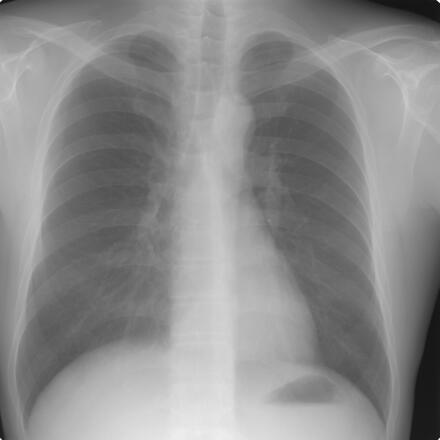
We converted two classic anonymized DICOM test files with default settings - no tuning.
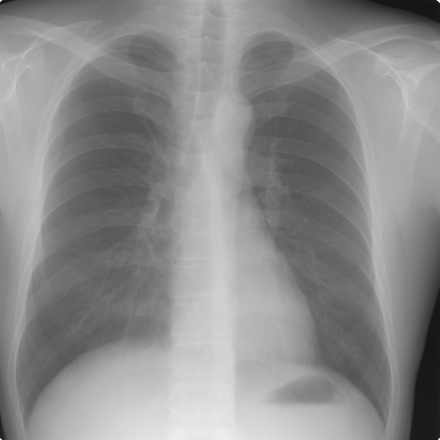
Single image: a chest X-ray, converted straight to JPG and PNG. This is the actual JPG output:
Multi-frame series: a cardiac angiography cine run - 137 frames stored in a single 2.6 MB DICOM with JPEG-compressed pixel data - converted to one PDF with a page per frame:
Convert it. A DICOM file needs a dedicated viewer, but the JPG or PDF version opens on any phone, browser, or document system - which is usually what patients, referring physicians, and insurers actually need.
The stored windowing is applied so the output matches the diagnostic presentation. Choose PNG for a lossless rendering. JPG at high ImageQuality is visually equivalent for sharing. For primary diagnosis, always use the original DICOM in a certified viewer.
JPG and PNG conversions return one image per frame, while PDF puts every frame on its own page in a single document. Use PageRange to convert only the frames you need.
ConvertAPI is HIPAA compliant: files are encrypted in transit, processed in memory, and deleted after conversion. The output image carries no DICOM header metadata.
DICOM to JPG, PNG, or PDF is one HTTP call - with transfer syntax decoding, windowing, and multi-frame handling done for you. Try your own scans in the interactive demo on the DICOM to JPG, DICOM to PNG, or DICOM to PDF pages.
Convert DICOM medical images to JPG. Applies window/level, with control over color space, quality, resolution, and size.
Convert DICOM medical images to PNG. Applies window/level, with control over transparency, resolution, scaling, and size.
Convert DICOM medical images to PDF with page size, orientation, margins, rotation, color, and optional PDF/A compliance.