Flatten PDF API
Flatten PDF forms and annotations into the page content to prevent further editing and ensure document integrity and security.
 Tomas, CEO
You have a PDF form that is already filled out, and you need to make sure nobody can change it: lock the form fields, freeze the annotations, and stop the text from being copied. That is exactly what flattening does - it converts interactive elements into static page content, so the document looks the same everywhere and can no longer be edited.
In this tutorial, we'll flatten a PDF in C# using the ConvertAPI PDF Flatten converter: lock filled form fields, disable annotations, and protect text from extraction, with a complete working example you can drop into your project.
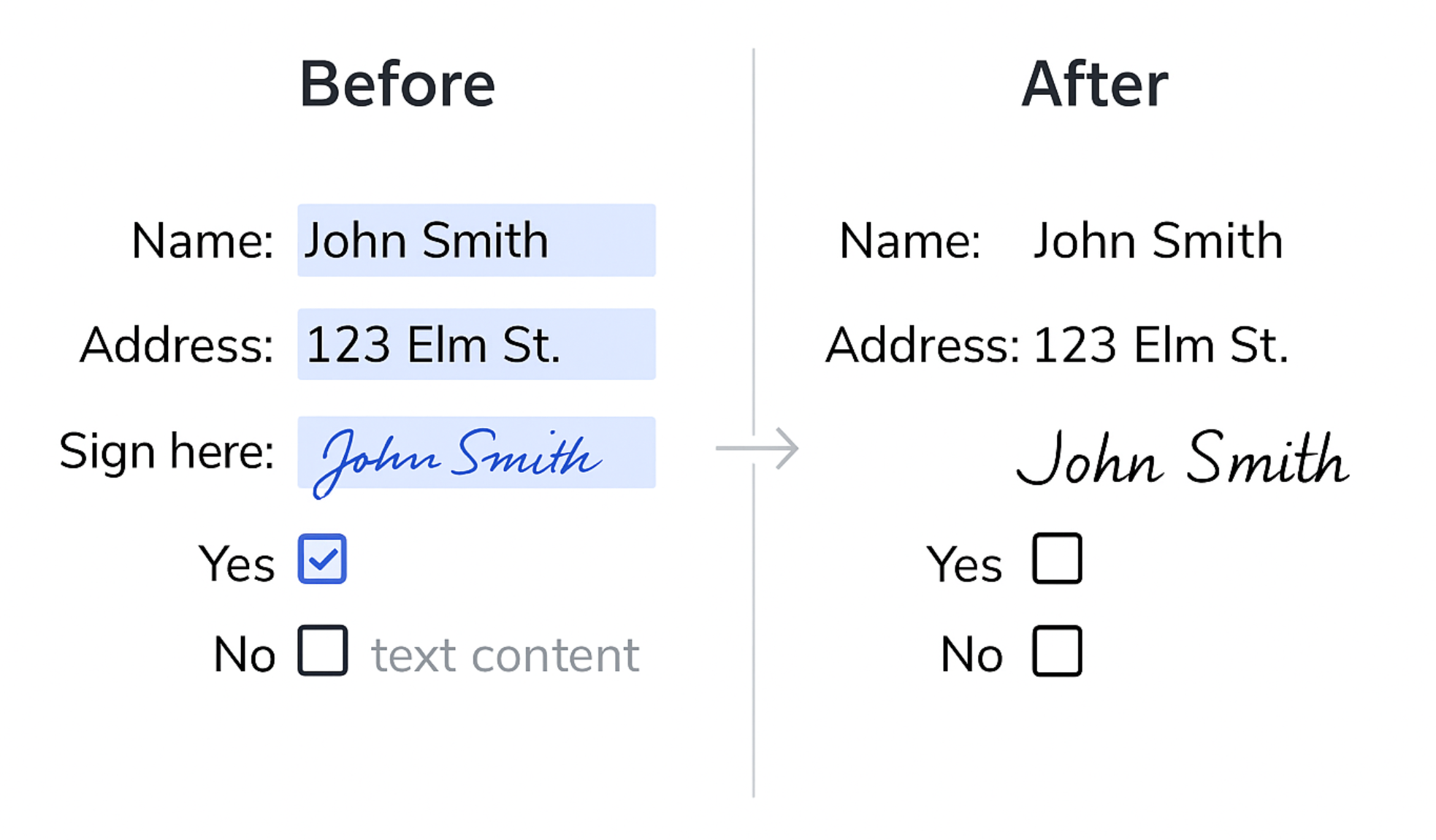
When you flatten PDF form fields in C#, editable inputs such as text boxes, checkboxes, and dropdowns become static page content. The values stay exactly as filled, but nobody can change them - the most common reason to flatten a completed form before archiving it or sending it on.
Flattening widget annotations such as buttons, list boxes, and signature fields makes them visible but non-interactive, so a signed or reviewed document cannot be quietly altered afterwards.
By converting text into vector paths, you protect PDF text from copying or extraction, making the document fully read-only without losing visual quality.
dotnet add package ConvertApiSign up at ConvertAPI and get your API token from the dashboard.
Store it securely as an environment variable:
setx CONVERTAPI_API_TOKEN "your-api-token"using System;
using System.IO;
using System.Threading.Tasks;
using ConvertApiDotNet;
class Program
{
static async Task Main(string[] args)
{
if (args.Length < 2)
{
Console.WriteLine("Usage: dotnet run -- <input.pdf> <output-folder>");
return;
}
var inputPath = args[0];
var outputDir = args[1];
// Get API token from environment variable
var apiToken = Environment.GetEnvironmentVariable("CONVERTAPI_API_TOKEN");
if (string.IsNullOrWhiteSpace(apiToken))
{
Console.WriteLine("Set CONVERTAPI_API_TOKEN environment variable first.");
return;
}
var api = new ConvertApi(apiToken);
try
{
var res = await api.ConvertAsync("pdf", "flatten",
new ConvertApiFileParam("File", inputPath),
new ConvertApiParam("FlattenControls", "true"),
new ConvertApiParam("FlattenWidgets", "true"),
new ConvertApiParam("FlattenText", "true")
);
await res.SaveFilesAsync(outputDir);
Console.WriteLine($"Flattened PDF saved to: {Path.GetFullPath(outputDir)}");
}
catch (Exception ex)
{
Console.WriteLine($"Error: {ex.Message}");
}
}
}var res = await new ConvertApi(Environment.GetEnvironmentVariable("CONVERTAPI_API_TOKEN"))
.ConvertAsync("pdf", "flatten",
new ConvertApiFileParam("File", "input.pdf"),
new ConvertApiParam("FlattenControls", "true"),
new ConvertApiParam("FlattenWidgets", "true"),
new ConvertApiParam("FlattenText", "true")
);
await res.SaveFilesAsync("output-folder");All three options default to true, so a plain pdf to flatten call with no parameters locks everything. Set an option to false to keep that layer as it is:
FlattenText to false. Form fields and annotations will still be locked.Password parameter and the file will be flattened just the same.We filled out a shipment release form - 11 interactive fields: text boxes, a dropdown, and checkboxes - and flattened it with the exact API call from the example above. These are the actual input and output:
Exactly as in the example above - upload the filled file and call pdf to flatten. The field values are preserved as static text on the page. Only the interactivity is removed.
No. Flattening permanently converts fields and annotations into page content. Keep the original interactive version if you may need to edit the values later.
Yes - set FlattenText to false. Form fields and annotations are still flattened, but the text remains searchable and copyable.
Loop over your files with the same ConvertAsync call - each conversion is independent, and requests can run in parallel with Task.WhenAll.
No. Unlike rasterizing pages into images, flattening preserves the original vector quality, fonts, and layout. If you also want to compare the two approaches, see flatten or rasterize a PDF.
PDF flattening in C# comes down to a single API call: lock form fields, flatten annotations, and protect text with a few lines of code. Whether you are building a secure document workflow or just need to make a PDF read-only in C#, flattening gives you control without compromising visual fidelity.
Try ConvertAPI PDF Flatten for C# and start flattening PDFs in your next C# project today! Get the NuGet package from https://www.nuget.org/packages/ConvertApi