Tired of jumping between apps to convert your files? The ConvertAPI GPT Plugin brings document conversion power into your ChatGPT conversations. Here’s everything you need to know about this handy tool that simplifies file management and conversion tasks.
What is ChatGPT?
ChatGPT is an AI conversational assistant developed by OpenAI. It can answer questions, generate content, provide information and now - thanks to plugins - perform specialized tasks like file conversion. While ChatGPT is great at text generation and processing, it has limitations when it comes to different file formats. That’s where plugins like ConvertAPI come in, extending ChatGPT’s capabilities beyond conversation.
The ChatGPT Plus, Pro, Team and Enterprise subscriptions allow users to access various plugins that add functionality to the base AI model. These plugins connect ChatGPT to external tools and services, making it more useful for everyday tasks.
How to Find ConvertAPI GPT Plugin
Getting started is easy:
- Open ChatGPT and go to the Plugin Store.
- Search for "ConvertAPI."
- Click “Start Chat” to add the plugin to your ChatGPT environment.
- Start managing your documents now with simple chat commands.
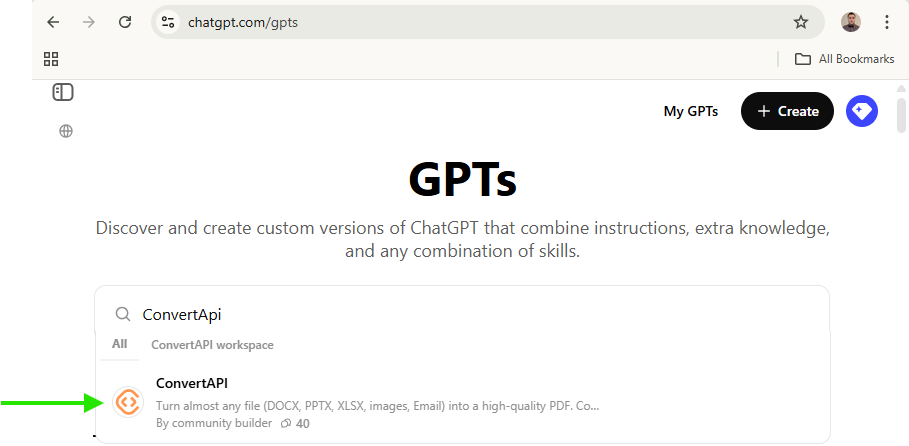
You can also find it with a direct link: ConvertAPI plugin
What Can Our GPT Plugin Do?
The ConvertAPI GPT plugin is feature packed:
Convert to PDF - Convert almost any file to high quality PDFs:
- Word (DOC, DOCX) to PDF
- Excel (XLS, XLSX, CSV) to PDF
- PowerPoint (PPT, PPTX) to PDF
- Images (JPG, PNG, TIFF, GIF, BMP, HEIC) to PDF
- Emails (EML, MSG) to PDF
Convert from PDF - Bring PDFs back to life:
- PDF to Word (DOCX)
- PDF to Excel (XLSX)
- PDF to PowerPoint (PPTX)
- PDF to Text (TXT)
- PDF to Image (JPG or PNG)
- PDF to PDF/A (archiving)
Organize & Arrange - Simplify PDF management:
- Merge multiple PDFs into one document
- Split PDFs by page range or bookmarks
Secure & Unlock - Protect or unprotect your documents:
- Add password to your PDFs
- Remove password from secured PDFs
Compress - shrink large PDF files while keeping quality:
- Compress PDFs with presets for web, e-books, printing, text and more
- Lossless PDF compression
OCR - Make scanned documents searchable:
- Convert scanned images and documents into searchable, selectable text in multiple languages
With ConvertAPI’s GPT Plugin you can handle your PDF conversions and document management right within ChatGPT - no extra software needed!
Who Should Use This Plugin?
The ConvertAPI GPT plugin is for:
- Students & Educators: Manage study materials, compress submissions, compile notes.
- Lawyers & Legal Staff: Digitize case files, make contracts searchable, handle evidence.
- Finance Professionals: Manage financial reports, digitize transaction histories, consolidate data.
- Insurance Teams: Extract important details from policies and convert claims documents quickly.
- Real Estate Agents: Securely manage agreements, format contracts neatly, handle documentation.
- HR Departments: Standardize resumes, secure sensitive employee information, simplify onboarding.
- Sales Professionals: Manage proposals, contracts, invoices to enhance client relationships.
Why Use the ConvertAPI GPT Plugin
Here’s why:
- Single Step Efficiency: Do multiple document tasks - conversion, compression, protection - in one command.
- No Extra Downloads: Use powerful document handling capabilities right within ChatGPT.
- User Friendly: No technical knowledge required; chat based interactions.
- Instant Support: Get help anytime you’re unsure.
- Privacy and Security: Your data is always confidential and secure. The plugin respects user privacy, an important consideration when handling sensitive documents and our system is known for high security standards too: https://www.convertapi.com/compliance
Simple Usage Example
Here are some quick examples:
Single Conversion:
Need your PDF file converted to a Word document? Just say:
"Convert this PDF to DOCX."
The plugin will provide your DOCX file in seconds.
Chained Conversion:
Need to convert multiple images into a secured PDF? Request:
"Convert these multiple images to PDF file and set password: 1234."
The plugin will process your images, create the PDF and apply the password protection.
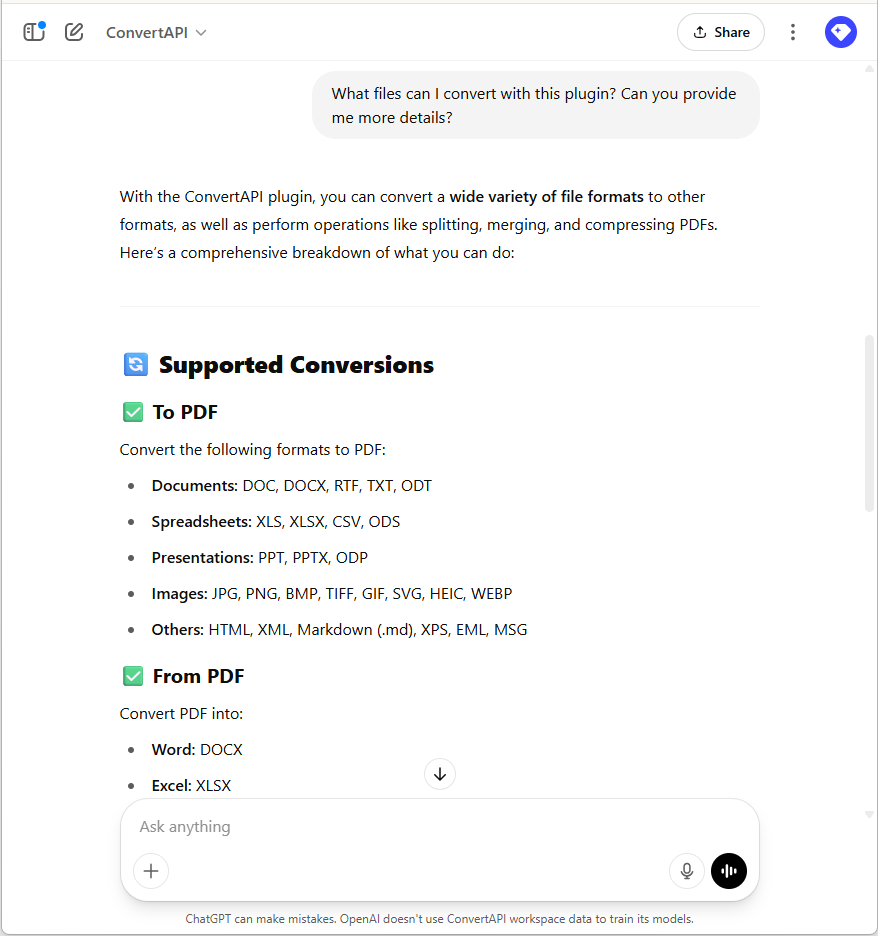
Quick Answers and Help
Ask directly:
- “What formats can I convert to PDF?
The plugin will list all supported input formats: DOCX, XLSX, PPTX, images and more.
- “Can I make a scanned document searchable?”
Yes, the plugin will explain its OCR capabilities to convert scanned text into searchable content.
Ask about errors or issues you have. The plugin can help with common problems and solutions: file format compatibility or conversion settings.
Get Started
Ready to get more productive? Install the ConvertAPI GPT plugin and manage your documents right within ChatGPT.
Start using the ConvertAPI GPT Plugin
Converse with ease!

 Paulius, Developer